Selecting the best structural engineering software goes far beyond choosing a popular platform. Industrial and process plant projects demand tools that can accurately model complex steel structures, analyze heavy equipment foundations, validate structural connections, coordinate multidisciplinary BIM models, and comply with international design standards.
Whether engineers are designing process plant structures, analyzing flare stacks, modelling modular skids, or verifying foundations subjected to dynamic equipment loads, the choice of software directly influences engineering accuracy, code compliance, project schedules, and long-term structural reliability. No single application is ideal for every scenario. Instead, experienced engineering teams rely on a combination of specialized tools, each suited to different stages of structural analysis, design, detailing, simulation, and documentation.
In this blog, we’ll explore the best structural analysis and design software used across industrial engineering projects. Rather than comparing software features from a vendor’s perspective, we share how multidisciplinary engineering teams apply these tools in real-world industrial environments, when each software delivers the greatest value, and why selecting the right platform is essential for achieving safe, efficient, and code-compliant structural designs.
Best Structural Engineering Software: A Practitioner’s Overview
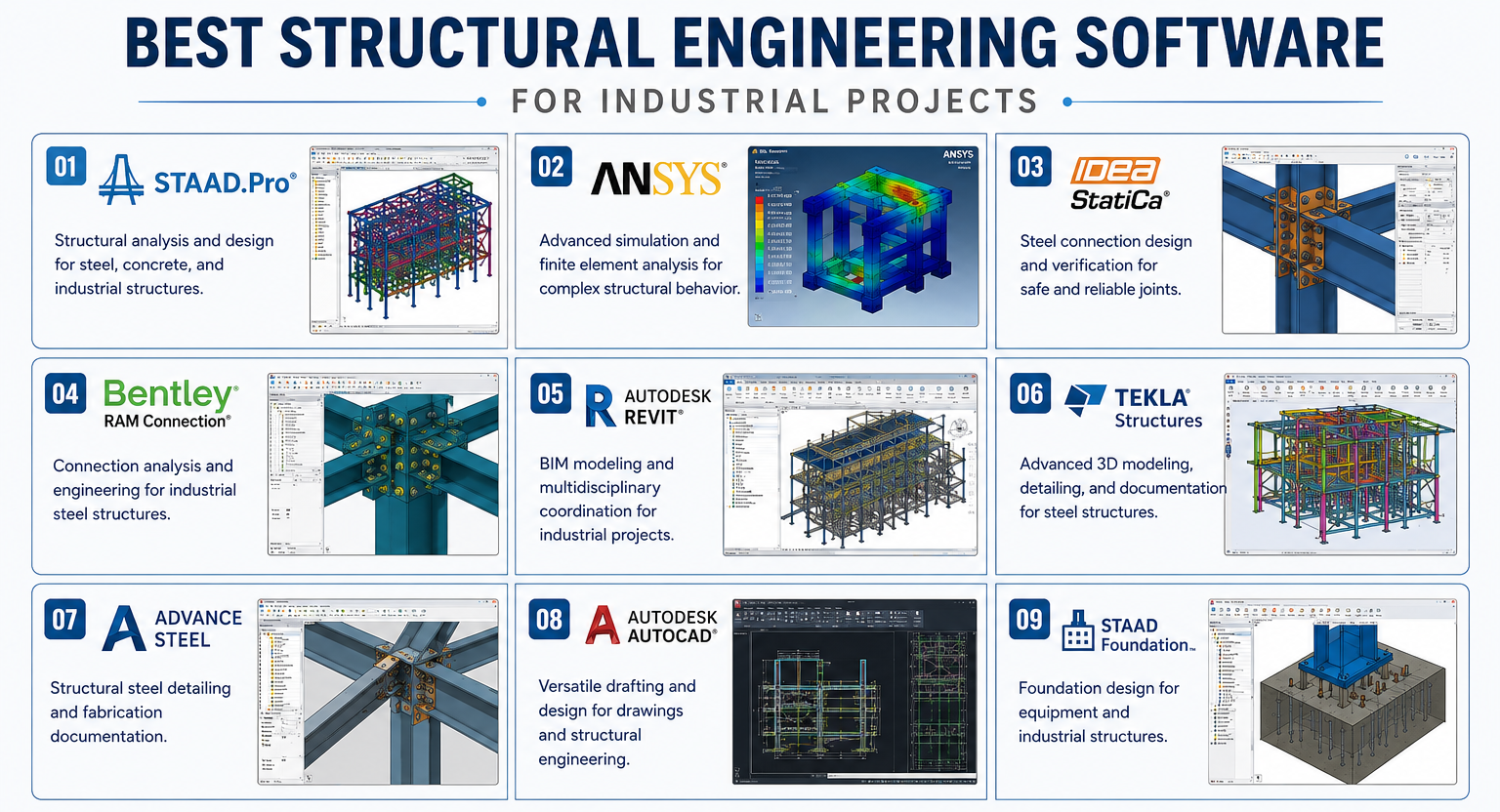 Modern industrial projects rarely depend on a single software platform. Structural engineers typically use multiple applications throughout the engineering lifecycle, with each tool serving a specific purpose. Understanding these categories helps identify which software is best suited for different engineering challenges.
| Software Category | Primary Purpose | Common Industrial Applications | Applicable Codes & Standards |
| Structural Analysis Software | Performs load calculations, stress analysis, seismic and wind evaluation | Process plants, pipe racks, equipment supports, flare stacks | AISC 360, Eurocode 3 (EN 1993), IS 800, ASCE 7, IBC, NBC, IS 875, IS 1893 |
| Structural Design Software | Develops intelligent 3D structural models and multidisciplinary coordination | Industrial facilities, refineries, power plants, manufacturing units | ISO 19650 (BIM), AISC, Eurocodes, IS 800 |
| Structural Detailing Software | Produces fabrication drawings, shop details, and steel documentation | Steel fabrication, modular skids, industrial buildings |
AISC 303 Code of Standard Practice, AWS D1.1, EN 1090, IS 800 |
| Steel Connection Design Software | Validates welded and bolted steel connections | Pipe racks, equipment platforms, heavy steel structures | AISC 360, AISC Design Guides, Eurocode 3 (EN 1993-1-8), IS 800, AWS D1.1 |
| Foundation Design Software | Designs foundations for static and dynamic equipment loads | Compressors, pumps, vessels, rotating machinery | ACI 318, ACI 351.3R, IS 456, IS 2974, Eurocode 2 (EN 1992) |
| Structural Simulation Software | Performs advanced finite element analysis for complex loading conditions | Cryogenic structures, fatigue analysis, vibration studies, seismic evaluation | ASME BPVC, API 579-1/ASME FFS-1, ASCE 7, EN 1993, DNV (offshore), project-specific design codes |
Each category plays a distinct role in delivering safe, constructible, and standard-compliant structural systems. For multidisciplinary industrial projects, engineering teams often combine several of these tools to achieve accurate analysis, coordinated design, efficient detailing, and successful project execution.
Best Structural Analysis Software
Industrial structural engineering projects involve far more than verifying whether a structure can safely carry its intended loads. Engineers must account for multiple load combinations, material behavior, international design codes, environmental conditions, and project-specific operating scenarios to ensure every structure performs safely throughout its service life. This is why structural analysis software plays a critical role in modern engineering projects.
Among the many solutions available today, STAAD.Pro and ANSYS remain two of the most widely adopted platforms for industrial structural engineering. While both support structural analysis, they serve different engineering objectives. Understanding when to use each software helps engineering teams achieve accurate, code-compliant, and economical designs.
STAAD.Pro
STAAD.Pro is one of the most established structural analysis and design software platforms used for steel, reinforced concrete, aluminum, and timber structures. It enables engineers to analyse structural behavior under various loading conditions while verifying compliance with international design standards. Rather than functioning solely as a calculation tool, STAAD.Pro supports the complete structural engineering workflow—from modelling and load definition to analysis, member design, and code checking—making it particularly suitable for industrial and infrastructure projects.
When Do We Use STAAD.Pro?
For most conventional industrial structures, STAAD.Pro serves as the primary structural analysis platform because it efficiently handles complex load combinations while supporting multiple international design codes.
Our design engineering teams typically rely on STAAD.Pro when designing:
- Pipe racks supporting extensive piping networks
- Equipment support structures
- Industrial steel buildings
- Process plant platforms and access structures
- Conveyor galleries
- Flare stack support systems
- Utility structures
- Heavy structural frames for manufacturing facilities
These projects often involve dead loads, live loads, equipment loads, wind loads, seismic forces, thermal effects, and operating loads that must be evaluated simultaneously.
Practitioner Insight
In our experience, STAAD.Pro is the preferred structural analysis platform for conventional steel and reinforced concrete structures where accuracy, efficient load management, and compliance with international design standards are critical. Its ability to evaluate multiple load combinations and support diverse structural systems makes it well suited for industrial facilities requiring long-term reliability. Whether designing process plant pipe racks, equipment support structures, industrial buildings, or flare stack support systems, STAAD.Pro delivers the accuracy and flexibility needed for complex industrial engineering projects.
Some of its key advantages include:
- Efficient evaluation of multiple load combinations
- Support for steel, concrete, aluminum, and composite structures
- Automated code-based member design
- Integration with foundation and connection design workflows
ANSYS
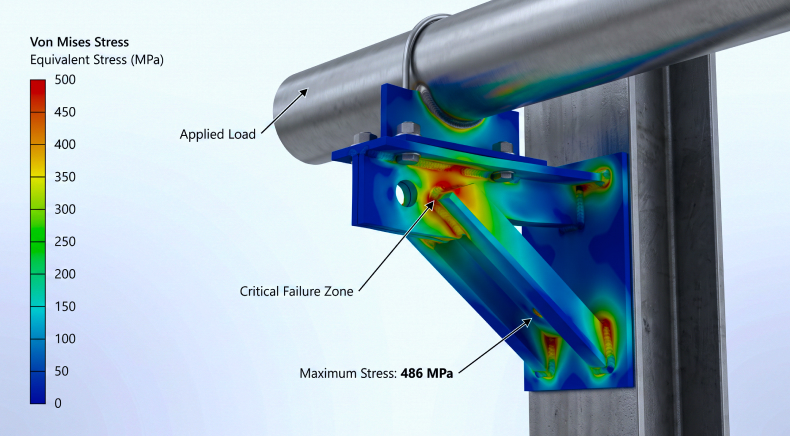
While conventional structural analysis software addresses most industrial design requirements, certain projects demand a much deeper understanding of structural behavior. ANSYS provides advanced finite element analysis capabilities that allow engineers to evaluate highly complex loading conditions, nonlinear responses, and detailed stress distributions that extend beyond conventional structural calculations. ANSYS complements STAAD.Pro by addressing engineering challenges that require advanced structural simulation.
When Conventional Structural Analysis Is Not Enough
Certain industrial assets operate under conditions where simplified assumptions are no longer sufficient. These situations require engineers to study how materials and structures respond to extreme operating environments.
ANSYS becomes particularly valuable when analyzing:
- Dynamic equipment loads
- Fatigue-sensitive components
- Thermal expansion effects
- Nonlinear material behaviour
- Large structural deformations
- Complex welded assemblies
- Localised stress concentrations
- Seismic response
- Wind-induced vibration
Industrial Applications of ANSYS
Advanced simulation plays an important role across numerous industrial sectors, particularly where structural integrity directly impacts operational safety.
Typical applications include:
- Cryogenic storage systems
- LNG and hydrogen facilities
- Pressure equipment support structures
- Tall industrial structures
- Modular process skids
- Offshore structural components
- Rotating equipment foundations
- Heavy equipment subjected to cyclic loading
These applications often experience complex loading scenarios that require more than conventional frame analysis.
Practitioner Insight
For projects involving dynamic loading, complex stress behavior, cryogenic operating conditions, or other demanding engineering scenarios, ANSYS provides the advanced finite element simulation needed to validate design decisions with greater confidence. In our experience, it is most effective when used alongside conventional structural analysis software, enabling engineers to accurately evaluate complex structural responses, improve design reliability, and deliver safe, code-compliant engineering solutions for critical industrial applications.
Its capabilities help engineering teams:
- Predict stress concentrations
- Evaluate fatigue life
- Study vibration characteristics
- Simulate thermal loading effects
Best Steel Connection Design Software
IDEA StatiCa
It is an advanced steel connection design and code-checking software that enables engineers to verify the strength, stiffness, and constructability of welded and bolted steel connections. Unlike conventional design methods that rely on simplified calculations, IDEA StatiCa uses component-based finite element analysis (CBFEM) to evaluate complex connection behavior under real loading conditions. This makes it particularly valuable for industrial projects where connection integrity directly influences structural safety, reliability, and long-term performance.
When Do We Use IDEA StatiCa?
Engineering teams typically rely on IDEA StatiCa when conventional connection calculations are insufficient to validate complex structural connections. The software is particularly useful for projects involving heavily loaded steel structures, customized connections, and non-standard geometries.
Our structural engineers commonly use IDEA StatiCa for designing and verifying:
- Pipe rack beam-to-column connections
- Equipment support structures
- Industrial steel platforms
- Heavy steel frames
- Flare stack support connections
- Modular skid structures
- Braced frame connections
- Customized welded and bolted steel joints
These projects often involve high axial, shear, bending, and torsional forces that require detailed connection verification beyond traditional design methods.
Practitioner’s Insight
IDEA StatiCa is the preferred solution for validating complex steel connections subjected to demanding loading conditions. It enables engineers to verify welded and bolted connections with greater confidence, improve fabrication feasibility, and ensure compliance with applicable design standards, making it particularly valuable for industrial facilities where structural integrity and connection performance are critical.
Some of its key advantages include:
- Advanced component-based finite element analysis (CBFEM)
- Accurate welded and bolted connection verification
- Support for complex and non-standard connection geometries
- Automated code compliance checks
Bentley RAM Connection
It is a steel connection design software used to analyze, and design welded and bolted steel connections in accordance with international structural design standards. It provides engineers with a practical and efficient solution for verifying standard connection designs used throughout industrial facilities. By integrating seamlessly with structural analysis platforms, RAM Connection streamlines connection design while ensuring structural safety and code compliance.
When Do We Use RAM Connection?
RAM Connection is commonly used for standard steel connection design on industrial projects where efficient code-based verification is required. It is particularly effective for repetitive connection types that occur throughout process plants and industrial facilities.
Our engineering teams typically use RAM Connection when designing:
- Pipe rack steel connections
- Industrial building frames
- Equipment support structures
- Process plant platforms
- Bracing systems
- Stair and access platform connections
- Utility structures
- Structural steel framing systems
These projects require efficient verification of welded and bolted connections while maintaining compliance with project specifications and international design standards.
Practitioner’s Insight
Bentley RAM Connection is the preferred solution for designing and verifying conventional steel connections in industrial projects. It enables engineers to automate repetitive connection design calculations, maintain consistency across hundreds of welded and bolted connections, and ensure compliance with applicable design standards. By integrating seamlessly with structural analysis workflows, RAM Connection helps improve engineering efficiency, accuracy, and project execution.
Some of its key advantages include:
- Efficient welded and bolted connection design
- Automated code-based connection verification
- Integration with STAAD.Pro and other Bentley structural solutions
- Faster design of repetitive steel connections
- Support for multiple international design standards
Best Structural Design Software
Structural engineering today extends beyond analysis alone. Engineers must collaborate with piping, mechanical, electrical, instrumentation, and process disciplines while developing coordinated 3D models that reduce design conflicts and improve constructability. BIM and structural modelling software support this collaborative approach by enabling intelligent model development, multidisciplinary coordination, and fabrication-ready documentation.
Autodesk Revit
Autodesk Revit is a Building Information Modeling (BIM) platform that enables engineers to develop intelligent structural models rather than traditional 2D drawings. Every structural element contains engineering information that remains coordinated throughout the design process.
When Do We Use Revit?
Revit is particularly effective when projects require close collaboration between multiple engineering disciplines.
Typical applications include:
- Industrial facility design
- Process plant structures
- Utility buildings
- Control rooms
- Pipe support coordination
- Equipment buildings
- Brownfield modifications
Practitioner’s Insight
We typically use Autodesk Revit on projects where structural design must remain fully coordinated with piping, mechanical, and electrical disciplines. Its BIM capabilities enable early clash detection, improve multidisciplinary collaboration, enhance constructability, and reduce design revisions throughout project execution.
Revit improves project coordination by enabling:
- Clash detection with piping and MEP systems
- Intelligent construction documentation
Tekla Structures
Tekla Structures is purpose-built for creating highly detailed steel models that support fabrication, manufacturing, and construction. Unlike general BIM platforms, Tekla focuses on delivering fabrication-ready structural information with exceptional detailing accuracy.
When Do We Use Tekla Structures?
Tekla is often selected when projects require:
- Fabrication-level steel detailing
- Complex industrial steel structures
- Modular skid fabrication
- Pipe rack steelwork
- Heavy structural frames
- Shop drawing production
- Material tracking
Practitioner’s Insight
In our experience, Revit and Tekla Structures complement rather than replace each other. We typically use Revit during the multidisciplinary BIM coordination phase to develop coordinated structural models before transitioning to Tekla Structures for fabrication-ready steel detailing. This workflow enables seamless cross-discipline collaboration while delivering the level of detailing and accuracy required for efficient fabrication and construction.
Tekla offers:
- Higher Levels of Development (LOD)
- Detailed bolt and weld modelling
- Fabrication-ready shop drawings
- Automated material reports
- NC file generation
Best Structural Detailing Software
Autodesk Advance Steel
Autodesk Advance Steel is a specialized 3D steel detailing software used to create fabrication-ready structural models, shop drawings, connection details, and material documentation. Built on the AutoCAD platform, it streamlines the transition from engineering design to fabrication by automating detailing tasks and generating accurate manufacturing deliverables. For industrial projects involving structural steel, Advance Steel helps reduce manual drafting effort while improving coordination between engineering, fabrication, and construction teams.
When Do We Use Advance Steel?
Our engineering teams typically use Advance Steel when projects require detailed steel fabrication documentation beyond conceptual or BIM modelling. It is particularly valuable during the detailed engineering and fabrication phases of industrial projects.
Typical applications include:
- Structural steel detailing for process plants
- Pipe rack fabrication drawings
- Equipment support structures
- Modular skid steelwork
- Industrial platforms and access structures
- Heavy steel frames
- Stairways, ladders, and handrails
- Steel connection detailing
Advance Steel enables engineers to develop highly detailed models that support efficient fabrication, material estimation, and site installation.
Practitioner’s Insight
Advance Steel is the preferred choice when projects require fabrication-ready steel detailing and seamless integration with manufacturing workflows. By automating the generation of shop drawings, bills of materials (BOMs), NC files, and connection details, it helps engineering teams improve fabrication accuracy, reduce rework during manufacturing and site assembly, and deliver consistent, high-quality project documentation.
Some of its key advantages include:
- Automated shop drawing generation
- Fabrication-ready steel detailing
- Automatic BOM and material reports
- NC file generation for manufacturing
- Intelligent connection detailing
Autodesk AutoCAD
AutoCAD remains one of the most widely adopted engineering drafting platforms for developing precise 2D drawings and engineering documentation across industrial projects. While advanced BIM and structural modelling software manage intelligent 3D models, AutoCAD continues to play a critical role in producing detailed construction drawings, fabrication documents, GA drawings, and project documentation required throughout the engineering lifecycle.
When Do We Use AutoCAD?
Our engineering teams rely on AutoCAD whenever projects require accurate engineering documentation, revisions, or detailed drafting to support design, procurement, fabrication, and construction activities.
Typical applications include:
- General arrangement (GA) drawings
- Structural fabrication drawings
- Foundation layout drawings
- Steel member detailing
- Construction issue drawings
- Equipment support details
- Brownfield modification drawings
- As-built documentation
AutoCAD provides the flexibility needed to produce clear, standardized engineering drawings for multidisciplinary industrial projects.
Practitioner’s Insight
Although modern industrial projects increasingly rely on BIM platforms for multidisciplinary coordination, AutoCAD remains an essential part of our engineering workflow. We use it to produce precise engineering drawings, construction deliverables, and fabrication documentation, ensuring accuracy, compatibility, and seamless communication throughout the project lifecycle.
Some of its key advantages include:
- Accurate 2D drafting and detailing
- Efficient drawing revisions and markups
- Standardized engineering documentation
- Broad compatibility with engineering software
- Easy integration with BIM and detailing platforms
- Extensive support for industrial drafting workflows
Best Foundation Design Software
STAAD Foundation
STAAD Foundation is a specialized foundation design software that enables engineers to design safe, economical, and code-compliant foundations for industrial facilities and infrastructure projects. It supports the design of isolated, combined, strip, raft, pile cap, and machine foundations while automatically evaluating soil bearing capacity, load combinations, reinforcement requirements, and settlement criteria. Rather than functioning as a standalone calculation tool, STAAD Foundation integrates seamlessly with structural analysis platforms such as STAAD.Pro, allowing engineers to transfer structural loads directly into foundation designs and streamline the overall engineering workflow.
When Do We Use STAAD Foundation?
For industrial projects involving heavy equipment and structural support systems, STAAD Foundation serves as the primary platform for foundation engineering by converting structural loads into optimized foundation designs while ensuring compliance with international design standards.
Our engineering teams typically rely on STAAD Foundation when designing:
- Equipment foundations for compressors, pumps, and turbines
- Pressure vessel and storage tank foundations
- Pipe rack column foundations
- Structural steel column footings
- Industrial building foundations
- Machine foundations subjected to dynamic loads
- Combined and raft foundations for process plants
- Foundations supporting modular skids and packaged equipment
These projects require engineers to evaluate static and dynamic equipment loads, soil bearing capacity, uplift forces, settlement, and load transfer to ensure long-term structural stability and operational reliability.
Practitioner’s Insight
We typically use STAAD Foundation on projects involving equipment foundations, structural footings, and machine foundations where accurate load transfer and foundation performance are critical. By integrating with structural analysis software, it streamlines foundation design, improves engineering accuracy, and supports safe, code-compliant solutions for industrial facilities.
Some of its key advantages include:
- Direct integration with STAAD.Pro for seamless load transfer
- Code-based concrete and reinforcement design
- Evaluation of soil bearing capacity, uplift, and settlement
- Support for static and dynamic equipment foundations
- Optimized reinforcement detailing and design reports
Which Structural Software Suits Which Project Type?
One of the strongest recommendations in the audit is to include a project-based decision table because it targets industry-specific search intent and differentiates Rishabh Pro Engineering from software vendors.
| Project Type | Primary Software | Supporting Software | Typical Standards |
| Process Plant Structures | STAAD.Pro | Tekla, AutoCAD | AISC, IS 800 |
| Pipe Racks | STAAD.Pro | Advance Steel | AISC |
| Heavy Equipment Foundations | STAAD Foundation | STAAD.Pro | ACI, IS 456 |
| Flare Stacks | STAAD.Pro | AutoCAD | Wind & Seismic Codes |
| Cryogenic Structures | ANSYS | STAAD.Pro | ASME, AISC |
| Modular Skids | Tekla + STAAD.Pro | Advance Steel | Client Standards |
| Steel Connections | IDEA StatiCa | RAM Connection | EN 1993, AISC |
| BIM Coordination | Revit | Navisworks | Project BIM Standards |
How Our Engineers Apply These Structural Engineering Tools on Industrial Projects
Selecting the best structural engineering software is only one part of delivering successful industrial projects. Equally important is knowing which software to use, when to use it, and how to combine multiple engineering platforms to solve complex design challenges.
At Rishabh Pro Engineering, our structural engineers work across oil & gas, chemicals, green hydrogen, power, manufacturing, and other process industries where projects often require multiple software applications throughout the engineering lifecycle. Rather than relying on a single platform, we combine structural analysis, BIM coordination, steel detailing, connection design, and foundation engineering tools to deliver safe, code-compliant, and constructible solutions.
Below are examples of how our engineering teams at Rishabh Pro Engineering apply these structural engineering software solutions across industrial projects.
Waste Heat Recovery Unit (WHRU)
Project Challenge
Waste Heat Recovery Units (WHRUs) involve large steel support structures that carry heavy process equipment, piping systems, ducting, platforms, and maintenance accessways. These structures are subjected to gravity, wind, seismic, thermal, and equipment loads while maintaining stability throughout plant operations.
Software Combination Used
- STAAD.Pro for structural analysis and steel member design
- Tekla Structures for detailed steel modelling and fabrication documentation
- AutoCAD for construction drawings and supporting documentation
Engineering Outcome
Our engineers developed code-compliant structural designs by analyzing multiple loading scenarios, optimizing steel member selection, and producing fabrication-ready deliverables that support efficient construction and installation while ensuring structural safety and maintainability.
Flare Stack Structural Analysis
Project Challenge
Flare stacks are among the tallest and most slender structures within process plants. Their design requires careful evaluation of wind loading, seismic forces, thermal expansion, operational loads, and structural stability under varying operating conditions.
Software Combination Used
- STAAD.Pro for global structural analysis
- ANSYS for advanced structural simulation where detailed stress evaluation was required
- AutoCAD for engineering documentation
Engineering Outcome
Learn how we carried out structural detailed engineering for a self-supported HP Flare Package, where a European flare package vendor partnered with us to perform structural analysis and develop design drawings for a flare stack project in Iraq. Using conventional structural analysis alongside advanced simulation, our engineers delivered a code-compliant, optimized structural solution with improved reliability and efficient steel utilization.
Cryogenic Cold Box Structures
Project Challenge
Cryogenic facilities operate at extremely low temperatures, introducing thermal stresses, differential contraction, and complex loading conditions that conventional structural analysis alone may not fully capture.
Software Combination Used
- ANSYS for advanced finite element analysis
- STAAD.Pro for overall structural analysis
- RAM Connection for steel connection verification
Engineering Outcome
Explore how we performed cold box structural stress analysis by combining global structural analysis with advanced finite element simulations to evaluate structural behavior under cryogenic operating conditions and support safe, reliable, and standards-compliant designs.
Modular Skid Structures
Project Challenge
Modular process skids require compact structural layouts capable of supporting process equipment, piping, instrumentation, and electrical systems within limited footprints. Since these modules are fabricated off-site and transported to operating facilities, constructability and fabrication accuracy are critical.
Software Combination Used
- STAAD.Pro for structural analysis
- Tekla Structures for fabrication-ready steel modelling
- Advance Steel for shop detailing
- Autodesk Revit for multidisciplinary BIM coordination
Engineering Outcome
Through coordinated structural modelling and fabrication detailing, our engineers helped minimize clashes between disciplines, streamline fabrication activities, and support faster modular assembly while maintaining compliance with project specifications.
Heavy Equipment Foundations
Project Challenge
Industrial rotating equipment such as compressors, pumps, reactors, and pressure vessels generates static and dynamic loads that must be transferred safely to foundations. Designing these foundations requires consideration of vibration, equipment loads, soil interaction, and applicable structural codes.
Software Combination Used
- STAAD Foundation for foundation design
- STAAD.Pro for structural load transfer analysis
- AutoCAD for foundation drawings
Engineering Outcome
Our engineers developed robust foundation designs capable of supporting operational equipment loads while satisfying structural performance requirements, helping improve equipment stability, reliability, and long-term plant performance.
Why Multiple Structural Engineering Software Platforms Matter
No single structural engineering software can address every engineering challenge encountered in industrial projects. Structural analysis, BIM coordination, steel detailing, finite element simulation, foundation design, and connection verification each require specialized capabilities.
By combining platforms such as STAAD.Pro, ANSYS, Autodesk Revit, Tekla Structures, Advance Steel, IDEA StatiCa, RAM Connection, and STAAD Foundation, our engineers select the most appropriate tool for each stage of the engineering workflow. This integrated approach enables us to deliver accurate structural analysis, coordinated multidisciplinary models, fabrication-ready documentation, and code-compliant designs tailored to the unique demands of industrial facilities.
Concluding Thoughts
Choosing the best structural engineering software is not about finding a single solution for every project, it is about selecting the right combination of tools to address specific engineering challenges. From structural analysis and design to steel detailing, connection design, foundation engineering, and advanced simulation, each software platform serves a distinct purpose within the engineering lifecycle. Experienced structural engineers evaluate project complexity, applicable design codes, constructability, and collaboration requirements before deciding which tools best support project objectives.
This approach enables the delivery of safe, efficient, and standard-compliant designs across industrial facilities, process plants, and infrastructure projects. At Rishabh Pro Engineering, we combine our structural engineering services with industry-leading structural software to develop practical, code-compliant solutions tailored to each client’s requirements. Whether supporting greenfield developments, brownfield expansions, or complex industrial facilities, our multidisciplinary teams deliver accurate structural engineering solutions that improve constructability, reduce project risks, and support successful project execution from concept through detailed design.
Frequently Asked Questions On Best Structural Engineering Software
Q: Can one structural engineering software handle an entire industrial project?
A: No. Industrial projects typically require multiple software platforms throughout the engineering lifecycle. Structural analysis, BIM modelling, steel detailing, connection design, and foundation engineering each demand specialized tools. Engineering teams often combine software such as STAAD.Pro, Autodesk Revit, Tekla Structures, IDEA StatiCa, and STAAD Foundation to deliver coordinated, code-compliant designs.
Q: How do structural engineers choose the right software for a project?
A: Software selection depends on several factors, including the project type, structural materials, loading conditions, applicable design codes, level of detail required, fabrication requirements, and multidisciplinary coordination needs. Rather than relying on a single platform, experienced engineers select the tools best suited to each stage of the structural engineering process.
Q: Why do industrial projects require multiple structural engineering software tools?
A: Each software platform serves a specific engineering function. For example, one application may perform structural analysis, while another supports BIM coordination, steel detailing, connection verification, or advanced finite element simulation. Combining specialised tools improves design accuracy, constructability, and collaboration across engineering disciplines.
Q: What is the difference between STAAD.Pro and ANSYS?
A: Although both are used for structural engineering, they serve different purposes. STAAD.Pro is primarily used for structural analysis and code-based design of steel and reinforced concrete structures, making it suitable for industrial buildings, pipe racks, equipment supports, and similar applications. ANSYS, on the other hand, is an advanced finite element analysis (FEA) platform used for evaluating complex structural behavior such as dynamic loading, nonlinear analysis, fatigue, thermal effects, vibration, and seismic response. Many engineering teams use STAAD.Pro for conventional structural design and ANSYS when projects require detailed structural simulation beyond standard code checks.
Q: Can BIM software replace structural analysis software?
A: No. BIM software such as Autodesk Revit improves coordination and documentation but does not replace structural analysis software. Engineers still rely on tools such as STAAD.Pro or ANSYS to verify structural performance, evaluate loading conditions, and ensure compliance with applicable design codes.